Developing Webs logo
Google
Web DW-Main DW-Photoshop
Visit the message board for solutions or post a question Check out the Classes offered for free at Developing Webs Voice Chat submit a tutorial, resources, article, font for publication consideration and earn a one way link back to your site Get more specifics about the Developing Webs Voice chat room and its room members View the current news at Developing Webs alternative sites which are resources for your d3evelopment needs Join Developing Webs Chat Link to us on your web page to help support this resource! Check out Developing Webs At yahoo groups! Developing Webs Home Adobe Photoshop Tutorials Macromedia Flash Tutorials Jasc Paint Shop Pro Tutorials Adobe Illustrator Animation basics Some Basic PHP tutorials Perl Tutorials HTML Tutorials Cascading Style Sheets javascript Front Page Tutorials Macromedia Dream Weaver Tutorials dreamweaver Publishing your site, FTP, ChMod, Promotions Tools to help you create your site Free and shareware fonts to download Photographs to use in your projects Shop for your site needs Free Online classes REcommend this site to others Log in or edit your information when logged in Developingwebs Log Out Change My Account details and preferences
RSS Newsfeed
for your site
DW News
Calendar
DW Forum
Right click on button and copy shortcut

Add to My Yahoo!

Reminder
Remember to book mark this site!


Request a Tutorial

How to work with Perl on Your Home Computer

by pixelatedcyberdust, 1/13/04


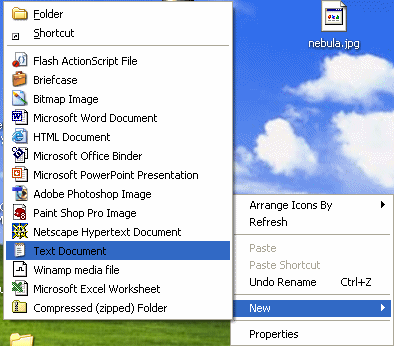
1. Right click on Desktop and select New>Text document


2. Rename the file as test.pl.  In reality you can call it whatever you want, but make sure it's .pl at the end.
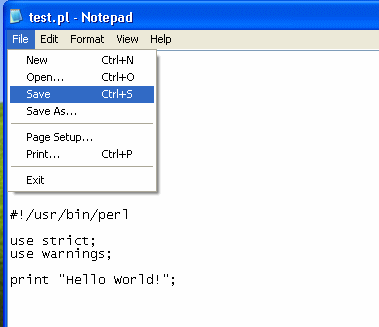


3. Double click your test.pl file and add your perl codes.  Then go to File>Save.
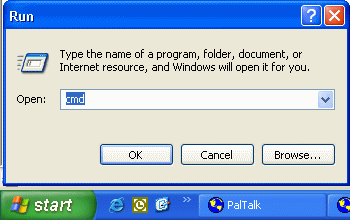


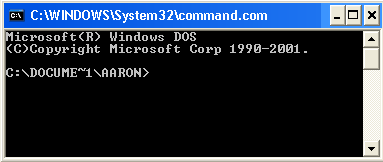
4. Click on your Start menu and click Run.  Type in cmd or command depending what version of Windows you are running.  Click enter.
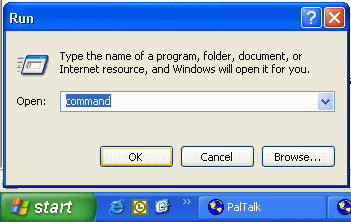


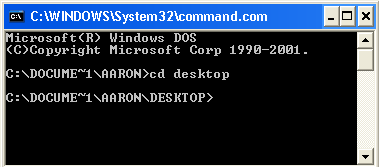
5. If you are not on on the Desktop directory by default, you need to type cd desktop
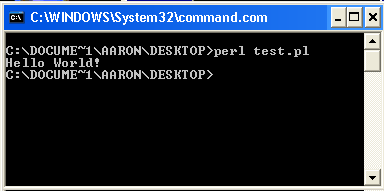


6. To run a perl script, you need to type in perl filename.  In our example, test.pl is our filename so we type in perl test.pl.  Click enter and the script should run.

The script will print or do whatever the script is supposed to do after you type in perl filename.


"Building The Web Into a Nicer Place -- One Site At A Time"
Developing Webs Group Copyright © 2001-2008 All Rights Reserved
Privacy and Legal