Microsoft FrontPage Text Attributes
By: CivicCX
Objective: To educate you about the different
text features on FrontPage.
1) The main text attributes toolbar is located on
the top portion of your FrontPage screen. It should look similar to the
screenshot show below.

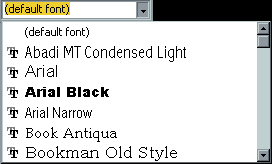
2) To select a font scroll you mouse over to
where is says (Default Font), and click on it once.
3) A menu should appear with all sorts of choices
of various fonts. Previews of what the fonts look like will be show to you
at this time as well.
4) To change the actual size of your text choose
the options that reads Normal. This is the default font that they put on
your site until you change it other wise.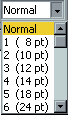
5) Click once on Normal and a menu will appear
below the word. Here you can choose the different sizes of your
fonts. Click on one and continue choosing them until you see a size that
suits your needs the best.
6) Now that you have your font, and font size
complete, your ready to choose your text color. To choose a text color
scroll your mouse over to a "A" symbol to the right hand side of your
text toolbar.
 7)
Click on the A once and a pallet of colors will appear. Scroll your mouse over
the different colors until you find which one you would like to choose.
When you have the one you wish to select click once and press enter. 7)
Click on the A once and a pallet of colors will appear. Scroll your mouse over
the different colors until you find which one you would like to choose.
When you have the one you wish to select click once and press enter.
8) The next text formatting option
is Bold, Italics, and Underline.

9) To choose any of these options
click on the B, I, or U. By selecting any of these options you will be
able to view the bold, italics, or underline.
10) The last text formatting option
you can choose is alignment, and indention.
11) To choose these options you will
look directly in the middle of your drawing toolbar where there are lines over
top of each other, and which look similar to the ones show here.
12) By clicking the one to the right
it will align everything right, clicking the middle it will align everything
center, and by selecting the left option it will align everything to the left.
13) The indention is right next to
these line by clicking on this it will indent your paragraphs a Tab with at a
time.
|





