Swish Transform Properties
This tutorial will show you the Transform Properties
1. Create a new document.
2. Click the Transform tab
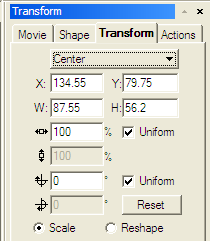
X is horizontal and Y is Vertical. His is where you align your objects.
Width and the height is the size of the object
 X- Scale
  Y-
Scale are the percentage size of the width and the height of an object
Y-
Scale are the percentage size of the width and the height of an object
If you leave the uniform checked then both the x and the y will remain
the same. If you have it unchecked then you have to manually set the
x and the y
 X-
Angle
X-
Angle  This is to rotate the X and the Y angles. The uniform is the same as
above.
This is to rotate the X and the Y angles. The uniform is the same as
above.
Reshape will return to its original settings by clicking on Reset





