 Tracing
Imported Images Tracing
Imported Images
The tracing of imported images can be a powerful tool in flash. The new
image is editable with colors and shapes available for change after tracing.
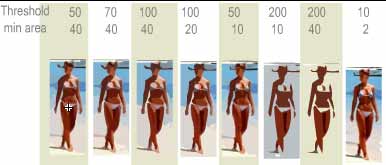
This tutorial is an exercise in what the trace bitmap settings are for.
1. Open up the tracing1.fla file.
2. Click File=> Import. Find the picture of the girl.jpg on your hard
drive and import.
3. Place a copy of the girl in each column of your stage so that you have
8 images across the stage.
4. Click on the first image in the column labeled 50-40, Click
Insert=>Convert to Symbol. Call the symbol 50-40 and make it a movie clip.
Click on the second image in the column labeled 70-40, Click
Insert=>Convert to Symbol. Call the symbol 70-40 and make it a movie clip.
Click on the third image in the column labeled 100-40, Click
Insert=>Convert to Symbol. Call the symbol 100-40 and make it a movie clip.
Make the rest movie clips just as above.
5. Double click the first image to open the symbol. Click on the image of
the girl inside to highlight her. Click Modify=>Trace bitmap. Set the
settings to Threshold 50 and minimum of 40. click ok. Click back to scene1.
6. Back at scene 1 double click on the Second image to open symbol 70-40.
Click on the image of the girl inside to highlight her. Click Modify=>Trace
bitmap. Set the settings to Threshold 70 and minimum of 40. click ok. Click
back to scene1.
7. 6. Back at scene 1 double click on the Third image to open symbol
100-40. Click on the image of the girl inside to highlight her. Click
Modify=>Trace bitmap. Set the settings to Threshold 100 and minimum of 40.
click ok. Click back to scene1.
Continue on these tracing using the settings in each column. When you are
done, you should be able to compare the different settings to see exactly
what tracing bitmap does.:) You can no w edit each file if you want since
they are no longer bitmaps.
|