The concept here is that the timeline of the graphic symbol is frame
by frame sequenced with the main timeline. In this tutorial you will
sequence each instance of the note symbol to get the notes to move
independent of one another.
You will need
this Font
installed to your windows/fonts
directory.
1. Open a new movie. Set the stage to 300 wide by 200 high,
golden yellow background, 12 fps.
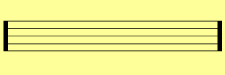
2. Rename layer 1 your background. Select your type tool, set to the
following and type in [=======[ (open bracket, 7 equal signs, open
bracket).
static text
musical symbols
40 pt
black
A/V = -3
3.
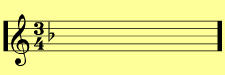
Lock the background layer. Insert a new layer called staff. Type in at
the same type settings &34b. Click Modify=> break apart. Use your
move tool to move the staff into position. Place the 3 over the 4 for
3/4 timing and set the flat symbol on the middle line, b flat. Lock the
staff layer.
4.
Insert a new layer called notes. Type in with the same settings, the
letter e. This will place a note on your stage. Switch to your move
tool. Click on your note on your stage to highlight. Click insert=>
Convert to symbol. Call the symbol "note". Set it as a
graphic, registration in the middle.
5.
Position the note in the lowest space right above the lowest line.
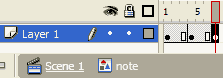
Double click the Note to edit in place.
6.
Add key frames to thenote symbol timeline in frames 4 and 7 by clicking
in frame 4 and hitting f6 and clicking in frame 7 and hitting f6.
7.
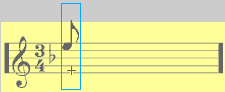
Click in frame 4 and use the move tool to move the note up to the top
space under the top line.
8. Set frame 4 to motion tween on the properties inspector. Set frame
1 to motion tween also. Click back on Scene 1.
9.
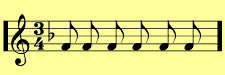
Hold your alt key down and click-drag your note symbol to make a new
copy. Place it at the same vertical position as the first but to the
right. Copy the symbol about 4 more times placing them in the lower
space and distributed across the stage.
10.
Click drag in frame 7 of all layers to highlight the column. Hit F5 to
extend the frames out to frame 7.
11. Sequencing the notes:
Click on the first note. set the starting frame for its animation to 3.
12. Click on each of the other notes and set the first frame to frame
numbers frame 1 and 7, trying not to repeat the numbers.







 static text
 3.
Lock the background layer. Insert a new layer called staff. Type in at
the same type settings &34b. Click Modify=> break apart. Use your
move tool to move the staff into position. Place the 3 over the 4 for
3/4 timing and set the flat symbol on the middle line, b flat. Lock the
staff layer.
3.
Lock the background layer. Insert a new layer called staff. Type in at
the same type settings &34b. Click Modify=> break apart. Use your
move tool to move the staff into position. Place the 3 over the 4 for
3/4 timing and set the flat symbol on the middle line, b flat. Lock the
staff layer.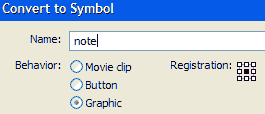 4.
Insert a new layer called notes. Type in with the same settings, the
letter e. This will place a note on your stage. Switch to your move
tool. Click on your note on your stage to highlight. Click insert=>
Convert to symbol. Call the symbol "note". Set it as a
graphic, registration in the middle.
4.
Insert a new layer called notes. Type in with the same settings, the
letter e. This will place a note on your stage. Switch to your move
tool. Click on your note on your stage to highlight. Click insert=>
Convert to symbol. Call the symbol "note". Set it as a
graphic, registration in the middle.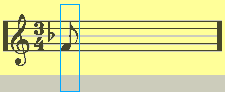 5.
Position the note in the lowest space right above the lowest line.
Double click the Note to edit in place.
5.
Position the note in the lowest space right above the lowest line.
Double click the Note to edit in place.
 6.
Add key frames to thenote symbol timeline in frames 4 and 7 by clicking
in frame 4 and hitting f6 and clicking in frame 7 and hitting f6.
6.
Add key frames to thenote symbol timeline in frames 4 and 7 by clicking
in frame 4 and hitting f6 and clicking in frame 7 and hitting f6.
 7.
Click in frame 4 and use the move tool to move the note up to the top
space under the top line.
7.
Click in frame 4 and use the move tool to move the note up to the top
space under the top line.
 9.
Hold your alt key down and click-drag your note symbol to make a new
copy. Place it at the same vertical position as the first but to the
right. Copy the symbol about 4 more times placing them in the lower
space and distributed across the stage.
9.
Hold your alt key down and click-drag your note symbol to make a new
copy. Place it at the same vertical position as the first but to the
right. Copy the symbol about 4 more times placing them in the lower
space and distributed across the stage.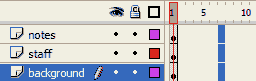 10.
Click drag in frame 7 of all layers to highlight the column. Hit F5 to
extend the frames out to frame 7.
10.
Click drag in frame 7 of all layers to highlight the column. Hit F5 to
extend the frames out to frame 7.