Developing Webs logo
Google
Web DW-Main DW-Photoshop
Visit the message board for solutions or post a question Check out the Classes offered for free at Developing Webs Voice Chat submit a tutorial, resources, article, font for publication consideration and earn a one way link back to your site Get more specifics about the Developing Webs Voice chat room and its room members View the current news at Developing Webs alternative sites which are resources for your d3evelopment needs Join Developing Webs Chat Link to us on your web page to help support this resource! Check out Developing Webs At yahoo groups! Developing Webs Home Adobe Photoshop Tutorials Macromedia Flash Tutorials Jasc Paint Shop Pro Tutorials Adobe Illustrator Animation basics Some Basic PHP tutorials Perl Tutorials HTML Tutorials Cascading Style Sheets javascript Front Page Tutorials Macromedia Dream Weaver Tutorials dreamweaver Publishing your site, FTP, ChMod, Promotions Tools to help you create your site Free and shareware fonts to download Photographs to use in your projects Shop for your site needs Free Online classes REcommend this site to others Log in or edit your information when logged in Developingwebs Log Out Change My Account details and preferences
RSS Newsfeed
for your site
DW News
Calendar
DW Forum
Right click on button and copy shortcut

Add to My Yahoo!

Reminder
Remember to book mark this site!


Request a Tutorial

Step by step simple flash game development
Random Heart Project 1C

Scaling your heart

There are many properties we can assign to our heart. Currently your heart project has actions on the heart button that will randomly set an _X and and _Y value.

In this exercise we will randomly scale the heart to anywhere from 50% to 120 % of the original. There is no one property that does this, however we can scale _xscale and _yscale to the same percentage simultaneously and have a scaled heart. To proportionately scale the heart we must save the random number we generate in a "container" or variable and use the variable as the value on both _xscale and _yscale.

Here is what you need to do:

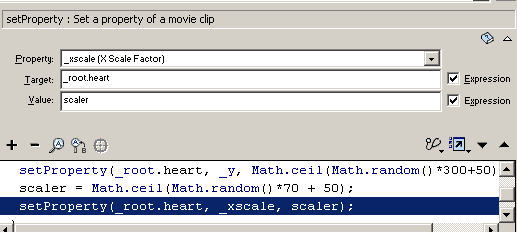
  1. On your button action, using the same event handler for _x and _y, Set a variable called scaler. Set the value as an expression that will generate a random whole number between 50 and 120.

     scaler = Math.ceil(Math.random()*70 + 50);
     

    where 70 is the spread of whole numbers between 50 and 120. and 50 is the offset from 0.
     

  2. Add a new line of script within the same event handler but under the set variable. Set the property for _Xscale by using the setProperty command. Use your heart target with absolute positioning and dot formula. Set the valu equal to the expression scaler, representing your variable.


  3. Test your movie and you will notice that the width of the heart varies. We need to set the _yscale to the same value as _xscale.
  4. The last line of script for setProperty is highlighted in your actions panel. Right click on it and select copy. Right click again and select paste.  Change the property attribute to _yscale.
  5. Test your movie.


"Building The Web Into a Nicer Place -- One Site At A Time"
Developing Webs Group Copyright © 2001-2010 All Rights Reserved
Privacy and Legal