1. Open your file. Notice there are three layers. The bottom layer
contains your text boxes. the middle layer has the text names for each text
box. The top layer is for actions. Click in the first frame of the actions
layer and open the actions panel.
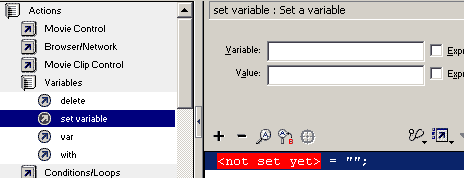
2. Creating our Random number: Click actions=> variables=> Set
variable (double click).
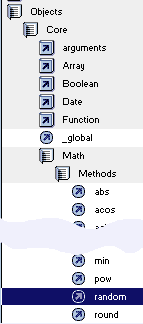
Name the variable randomnumber. Click in the value field. Click objects=>
core=> Math=> Methods=> Double click random. The script Math.random() will
appear in the blank.
Since this number will be a number between 0 and 1, we must use a
multiplier to make it larger then 1, so add * 10 which will multiply it by
10.
Check
expression so the script will be interpreted by the server, instead of
literal. The resulting script in the actionsript window looks like this:
randomnumber = Math.random() * 10;
3. Round our random generated number UP. Click on the script line
in the main action script area. Click actions=> variables => Set variables
(double click). Set this variable to randomceil by typing it in the variable
parameter. Click in the value field. Click objects=> core=> Math=> Methods=>
Double click ceil. The script Math.ceil() will appear in the blank. We want
out random generated number to be rounded using this Math.ceil
command, so we can't generate a new one or we will be rounding a new one.
We
place the name of the variable which is equal the current random number in
the parentheses; type in randomnumber inside the parentheses. Check
expression. The resulting script looks like this:
randomceil = Math.ceil(randomnumber);
4. Round our random generated number DOWN. Click on the last line of
the script line in the main action script area. Click actions=> variables =>
Set variables (double click). Set this variable to randomfloor by typing it
in the variable parameter. Click in the value field. Click objects=> core=>
Math=> Methods=> Double click floor.
The
script Math.floor() will appear in the blank. We want our random generated
number to be rounded using this Math.floor command. Type in
randomnumber inside the parentheses. Check expression. The resulting script
looks like this:
randomfloor = Math.floor(randomnumber);
4. Round our random generated number "Round". Click on the last
line of the script line in the main action script area. Click actions=>
variables => Set variables (double click). Set this variable to randomround
by typing it in the variable parameter. Click in the value field. Click
objects=> core=> Math=> Methods=> Double click round.
The
script Math.random() will appear in the blank. We want our random generated
number to be rounded using this Math.random command. Type in randomnumber
inside the parentheses. Check expression. The resulting script looks like
this:
randomround = Math.round(randomnumber);
There are now 4 lines of script in the action panel now. We can lock the
action panel Unlock the textbox layer. Use your arrow tool to click on the
top box to highlight. Set the Var to randomnumber.
Highlight the next text box. Set the var to candomceil.
Highlight the 3rd dynamic text box, and set the var to our 3rd variable,
randomfloor.
Highlight the last dynamic text box and set the var to randomround.







 Check
expression so the script will be interpreted by the server, instead of
literal. The resulting script in the actionsript window looks like this:
Check
expression so the script will be interpreted by the server, instead of
literal. The resulting script in the actionsript window looks like this:  We
place the name of the variable which is equal the current random number in
the parentheses; type in randomnumber inside the parentheses. Check
expression. The resulting script looks like this:
We
place the name of the variable which is equal the current random number in
the parentheses; type in randomnumber inside the parentheses. Check
expression. The resulting script looks like this: The
script Math.floor() will appear in the blank. We want our random generated
number to be rounded using this Math.floor command. Type in
randomnumber inside the parentheses. Check expression. The resulting script
looks like this:
The
script Math.floor() will appear in the blank. We want our random generated
number to be rounded using this Math.floor command. Type in
randomnumber inside the parentheses. Check expression. The resulting script
looks like this: The
script Math.random() will appear in the blank. We want our random generated
number to be rounded using this Math.random command. Type in randomnumber
inside the parentheses. Check expression. The resulting script looks like
this:
The
script Math.random() will appear in the blank. We want our random generated
number to be rounded using this Math.random command. Type in randomnumber
inside the parentheses. Check expression. The resulting script looks like
this: