|
 |
|||||||||||||
 |
 |
|||||||||||||

|

"Building The Web Into a Nicer Place -- One Site At A Time"
|
|
|
|||||||||||
| |
||||||||||||||

|
|
|||||||||||||
 |
|
|||||||||||||
|
|
|||||||||||||
|
|
|
|||||||||||||
|
"Building The Web Into a Nicer Place -- One Site At A Time"
|
|
|
|||||||||||
| |
||||||||||||||
|
|
|
|||||||||||||
|
|
|
|||||||||||||



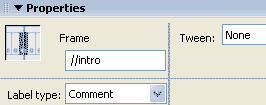 We
can use comments to denote frames in the timeline not used in scripts.
Often we will label frames for scripting to point to and to navigate to
frames in a movie. In the frame label box of the property inspector we can
simply put a // in front of the frame name, and the name on the timeline
will be a comment, denoted by a green //.
We
can use comments to denote frames in the timeline not used in scripts.
Often we will label frames for scripting to point to and to navigate to
frames in a movie. In the frame label box of the property inspector we can
simply put a // in front of the frame name, and the name on the timeline
will be a comment, denoted by a green //.


