Swish Actions
This tutorial will describe the actions that is displayed
in Swish
Play
Use this action to play a movie or a sprite
Stop
Use this action to stop a movie or a sprite

Go to Frame
Frame is the specific frame number
Next is the current frame is skipped and the following
frame is displayed
Prev.is the current frame is skipped and the previous
frame is displayed
Frame is the current lable the frame is named.

If Frame Loaded
Number is the specific frame number
Label is the specific frame name

Label
You can label your frames. Instead of having a calling
a frame by a number. You can call the frame by its name

Tell Target
Is used when you want Sprites or Loaded Movies
to load at another level.
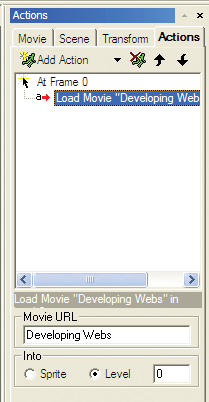
Load Movie
Movie URL is where you specify the .swf to load.
If you dont specify a url the flash player will load where the specific
file is saved.
Level is where you can specify where you want to
load the movie. The higher the level is the movies will load ontop of
other movies.

Unload Movie
You can specify what level you want the movie to be unloaded.
Any movie that is playing in that level is cleared
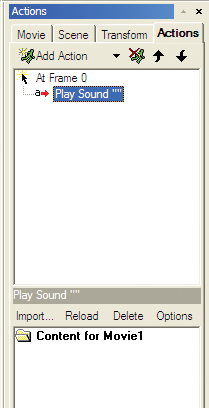
Play Sound
You can import sound by using the import button.
You can import .wav and .mpe files.
Reload is you can reload the previous sound if the file
has been changed.
Delet is if you want to delete a sound
Options is where you can edit the compression, loop sound(the
more times put it too the more times it will play), volume,sound effect,
and preload sound.

Stop Sound
If you dont want a specific sound to play anymore
Stop All Sounds
You use this action if yo want to stop all sounds in a
movie

Go To URL
Url is if you want it to go to a specific url or
a website
Target is if you want to load it in a specific
window

FS Command
You use this to send command to a player or a browser
Command is you can specify the command you want
to enter
Argument this provides extra script to the command

JavaScript
You use this to excute JavaScript

Mailto
To is where you put the email of the recipent
CC is where you put the copy of the email to the
recipent
Subject is where you provide a subject of the
email
Message body you can provide a specific message





