|
 |
|||||||||||||||||||||
 |
 |
|||||||||||||||||||||

|

Inserting a Table using Dream WeaverTables are used to organize
information on a
page.
1. Click INSERT => TABLE 4. Click on your table to highlight the entire table. You know it is highlighted when the handles appear around it. The properties window below will look like the picture below. You can set the rows, width, height, cell padding, spacing, alignment on the page center, left or right; and border width.
5. Click the downward arrow on the bottom right hand corner of this properties panel to get to addition properties. Here you set the background color, border colors,and background image. By clicking the cross hair next the bgimage, you can link to another file you have there Or click the folder to browse for a file on your hard drive..
6. Formating any cell or groups of cells can be done by highlighting the cell(s). Your properties window will allow you to set the Font and other text attributes.
7. Click on the downward arrow on the lower right of the cell properties window. This will display additional proerties you can set such as the horizontal and vertical alignment, width, height, nowrapping, background image and color, border color. Once again you can taget an open file or browse for a file on your hard drive for the background.
"Building The Web Into a Nicer Place -- One Site At A Time"
|
|
|
|||||||||||||||||||
| |
||||||||||||||||||||||

|
|
|||||||||||||||||||||
 |
|
|||||||||||||||||||||



 They
are used to
organize data and images, as well as
position information and pictures throughout a page. This
page is a complex combination of tables which allows the writer to organize it
into the design of choice.
They
are used to
organize data and images, as well as
position information and pictures throughout a page. This
page is a complex combination of tables which allows the writer to organize it
into the design of choice.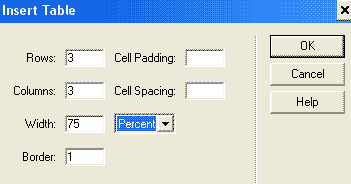 2.
Select the number of Rows, columns, the Cell padding and cell spacing in pixels,
with of table in percent or pixels, and the border size. Click OK
2.
Select the number of Rows, columns, the Cell padding and cell spacing in pixels,
with of table in percent or pixels, and the border size. Click OK


