|
 |
||||||||||||
 |
 |
||||||||||||

|

Declaring a Dreamweaver Web SiteSetting up a folder as your root directory for a local webWe declare a web site in Dreamweaver so dreamweaver knows where the local files are and can write relative paths to them for files anywhere within the local web folder. We can have many web sites as we want to work on locally, and we can switch between them. 1. In dreamweaver, click on the Site menu and select New Site. Site=> New Site.
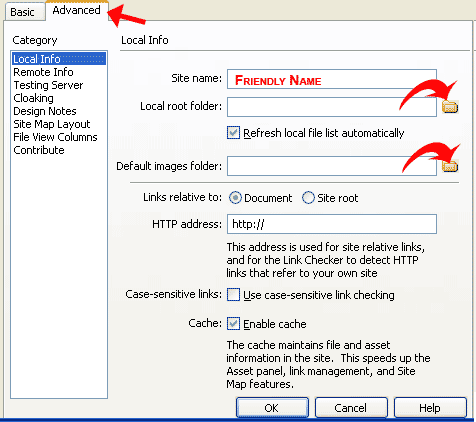
2. The site manager will appear. Click on the advanced tab. 3. Type in the site name. This is a friendly name, so you can distinguish it from the other sites on your computer. 4. For Local root folder, click the folder to the right and browse your hard drive for the folder your files will be saved locally in. Click ok on the browse window. 5. Set the Default images folder as an image folder inside your root folder. This prevents bad links, and will allow dreamweaver to write appropriate relative links.
6. If you are on a linux server, you may want to check the box to enable case sensitive link checking, since linux sees caps and lower case as two different letters.
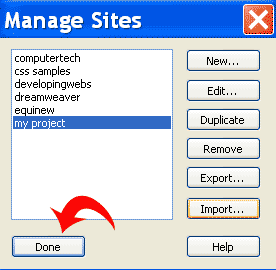
8. To switch between sites. click Site=> Manage sites. Select your site and click Done.
"Building The Web Into a Nicer Place -- One Site At A Time"
|
|
|
||||||||||
| |
|||||||||||||

|
|
||||||||||||
 |
|
||||||||||||




 7. Click ok.